
· Aaron Darr · engineering · 11 min read
Training vision models for manufacturing: what you can do now, and how to get it right
What computer vision can do on a production line today, real results from P&G, Audi and Ford, a simple way to work out the payback, and the technical mistakes that sink DIY projects.

It’s the last hour of the night shift. Your inspector has looked at a few thousand identical parts since ten o’clock. One of them has a hairline crack. It goes in the box with the rest.
Your inspector did nothing wrong. People just aren’t built for this job. Sandia National Laboratories reviewed decades of inspection research and found that error rates of 20% to 30% are common, and that missed defects happen more often than false alarms.
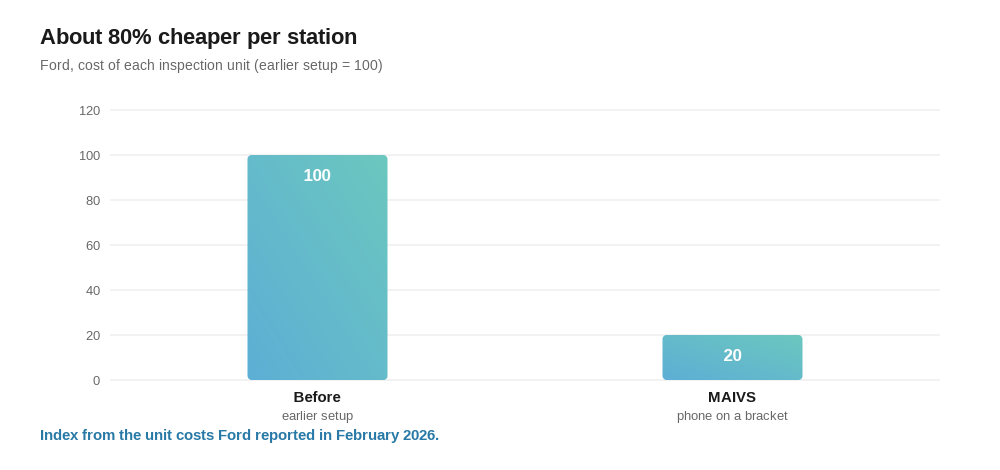
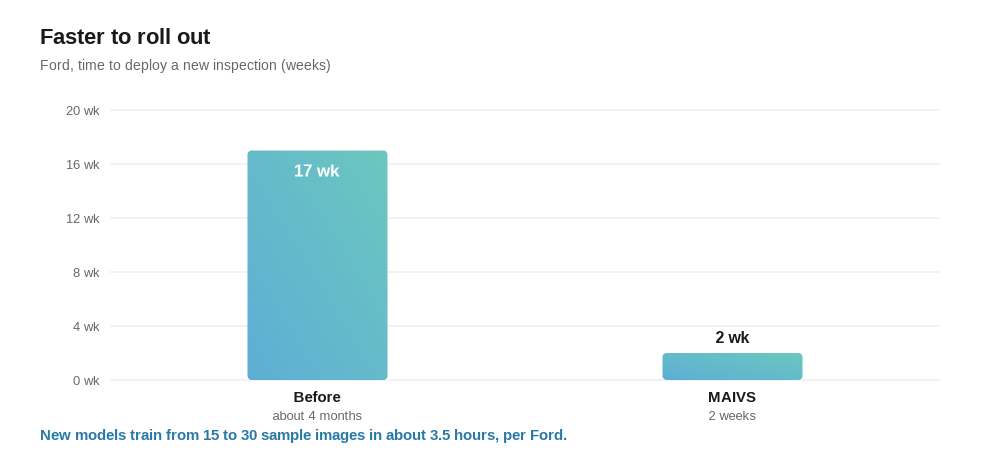
Until recently, the answer was a dedicated vision station, a specialist integrator and months of setup. That has changed. Ford’s engineers now build inspection stations from ordinary smartphones on brackets, and the phones run the AI model themselves. To teach a station a new check, they need 15 to 30 sample images and about 3.5 hours.
So start with a different question. Park “which model should we use?” for now, and ask “what could a camera on our line do for us?” The model question comes later, and it matters less than most people expect.
The first half of this post is for plant managers: what’s possible, what other manufacturers got out of it, and how to size payback. The second half is for the engineers who will build it, including the mistakes that sink a lot of DIY attempts.
What a camera and a model can do on your line
Here is what’s working in plants right now, grouped by the problem it solves.
For quality, that means finding surface defects such as scratches, dents, cracks and paint runs. It also covers checking that an assembly is complete, with every clip, screw and connector in the right place, confirming the right variant was built, and reading date codes and labels so the bad ones get rejected.
For throughput, it means counting parts on a belt or a pallet, spotting jams before they stop the line, sorting by size or grade, and measuring parts with a calibrated camera instead of a gauge.
For safety, a camera can flag a person inside a robot cell, check for hard hats and hi-vis where they’re required, or warn when a forklift and a pedestrian are on a collision path.
And for traceability, it can photograph every part as it leaves the station and store the image with the serial number. When a customer complains six months later, you pull up the picture.
Most of these do not need a research team. Some of them don’t even need training data, as we’ll show below.
What this looks like at scale
Big manufacturers are past the pilot stage.
P&G: less scrap, and new checks live in a fraction of the time
Procter & Gamble, the maker of brands like Pampers and Tide, is rolling out AI-based quality inspection from Siemens across its operations worldwide. The system checks every product in real time, including soft, textured materials and heavily decorated packaging that older vision systems found hard. When it finds a fault, it can raise an alert or have the product removed from the line.
The results P&G and Siemens report are the kind a finance team likes. Scrap is down 10% to 20%, depending on the product. And a new inspection is commissioned five to ten times faster than a traditional, custom-built vision system.
Audi: every weld, not a sample
Audi checks spot welds with AI at its Neckarsulm plant. A car body has about 5,000 spot welds. Before, staff checked them with ultrasound on random samples. The AI system analyses around 1.5 million spot welds per shift, across 300 vehicles, and Audi announced it would roll the infrastructure out to Brussels, Ingolstadt and Volkswagen’s Emden plant. The big change here is coverage. Every weld gets checked.
Ford: smartphones as inspection stations
The smartphone stations from the start of this post are Ford’s Mobile AI Vision System (MAIVS), first built at its plant in Hangzhou. Ford reports that the system has inspected 840,000 components there and reaches 99.9% accuracy on complex checks like chassis and door trim. This is the example we’d show a sceptical plant manager, because of what each new check now costs and how long it takes to set up:
BMW: one platform for the whole line
BMW has built its own platform, AIQX, which takes data from cameras and sensors along the line. It checks completeness, identifies variants and detects assembly anomalies, and it gives line workers feedback in real time on smart devices.
You do not need to be a carmaker to do this. The same parts are available to a plant with one line and a few hundred staff.
Why it pays for itself
Go back to that 20% to 30% error rate. Looking for rare flaws on hundreds of identical parts an hour is a task people are bad at, and they get worse as a shift goes on.
A camera does not get tired at 3 a.m. It checks every part, and it saves a picture of each one. Fewer bad parts reach customers. And your inspectors get time back for the work a camera can’t do, like finding out why the defect keeps happening.
Here is a rough way to size it. The inputs below are made up. Use your own.
| Input | Example |
|---|---|
| Parts per year | 2,000,000 |
| Defect rate | 1% (20,000 bad parts) |
| Share that manual inspection misses | 20% (4,000 escapes) |
| Cost of each escape (return, rework, freight, goodwill) | $50 |
| Cost of escapes per year | $200,000 |
If a vision system stops only half of those escapes, it is worth $100,000 a year before you count inspector time, scrap caught earlier or a single avoided recall. Put that next to the cost of a one-station pilot. For a lot of plants, it isn’t close. And if P&G’s 10% to 20% cut in scrap holds anywhere near that on your line, that saving comes on top.
How it works, step by step
This is the part for the engineers in the room. Here is the order we’d do the work in.
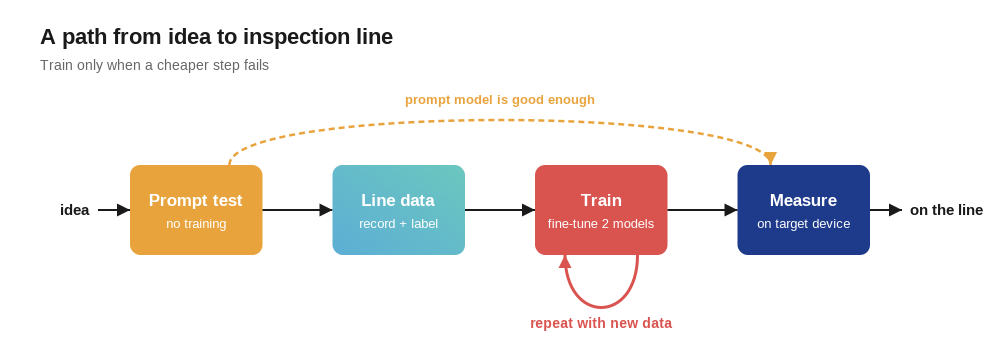
Step zero: try a model that needs no training
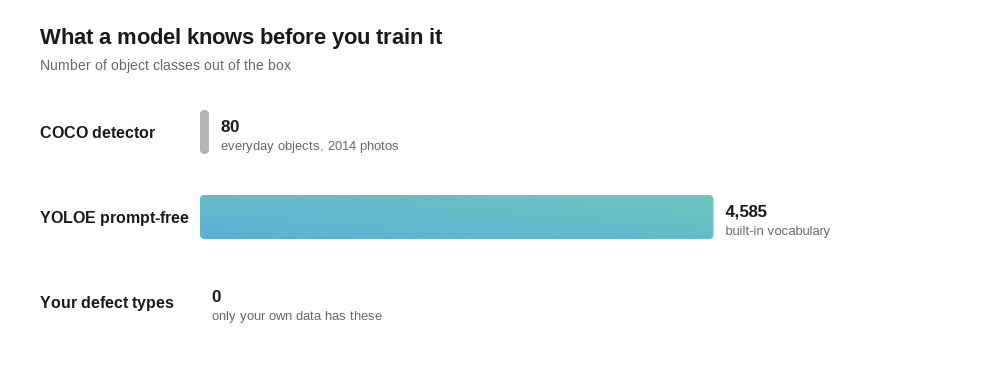
Open-vocabulary models let you skip training for many jobs. YOLOE, from Tsinghua University, finds objects from a text prompt (“blue crate”), from one example image with a box drawn around the part, or with no prompt at all, using a built-in vocabulary of 4,585 names. Its authors report it beats YOLO-Worldv2-S by 3.5 AP on the LVIS benchmark, with a third of the training cost.
This kind of model is great for quick proofs of concept, for counting and locating parts, and to pre-label images so people only fix boxes instead of drawing them. Point a camera at the line, try a handful of prompts and one image prompt, and log the hits and false alarms. If the results are good enough, you may not need to train anything.
It has limits. It knows everyday things such as colour, shape and common objects. It does not know your part numbers, and “burr on the inside edge of a stamped bracket” means nothing to it. That is where training comes in.
When you train, use data from your own line
Defect detection almost always needs a trained model. The rule for data is simple: collect it where the model will run. That means the same camera, lens, angle, lighting, belt speed and background. The easiest way is to record video on the running line and pull frames from it.
Plan for how rare defects are. If 1% of parts are bad, a model can score 99% by saying “OK” every time. You will need to set bad parts aside, or make controlled defects, so the model sees enough of them.
Split the job: find, then judge
For small defects, one detector scanning the whole frame struggles. The defect might be a few dozen pixels in a frame of millions. We split it into two small models instead:
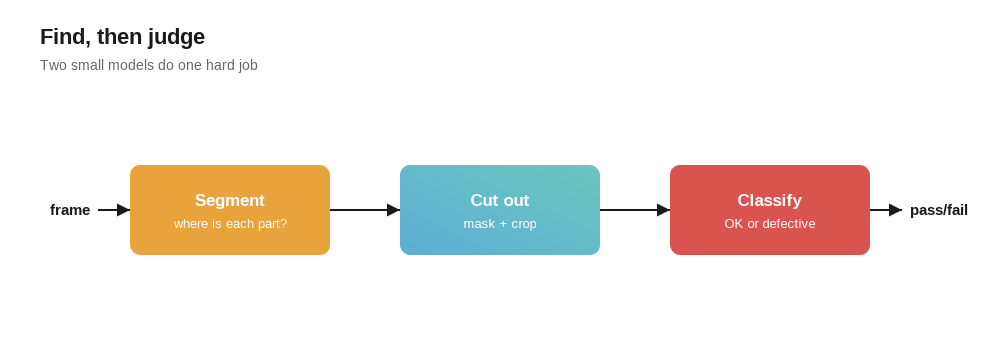
A segmentation model such as RF-DETR-Seg finds each part and traces its outline. The code uses that outline to cut the part away from the belt and crop it. A classifier such as ConvNeXt then looks at the crop and answers one question: OK or defective?
The defect now fills much more of the image the classifier sees. Labelling is easier, because you outline parts for one model and sort crops into two folders for the other. And you can fix each stage on its own. Missed parts mean the finder needs work. Missed defects mean the judge needs more examples.
Pick a model, but don’t agonise over it
Model comparison charts plot accuracy against speed. The accuracy is measured on COCO, a 2014 dataset with 80 everyday classes like person, car and cell phone. The speed is usually measured on a data-centre GPU. Neither one is your line.
After fine-tuning on your own images, the order on that chart is a loose guide at best. That’s one reason multi-domain benchmarks like Roboflow 100 exist. Our approach: shortlist two models that fit the hardware and the licence, train both on the same data, and compare them on held-out images from your line. It takes a day or two of GPU time and ends the debate.
Make it fast enough on the hardware you’ll ship
Measure frames per second for the bare model on the target device before you build anything around it. Then tune three things in this order:
- Export format. Convert the model to ONNX, TensorRT, OpenVINO or NCNN to suit the device. Ultralytics alone supports more than 20 targets.
- Model size. Use the smallest one that is accurate enough.
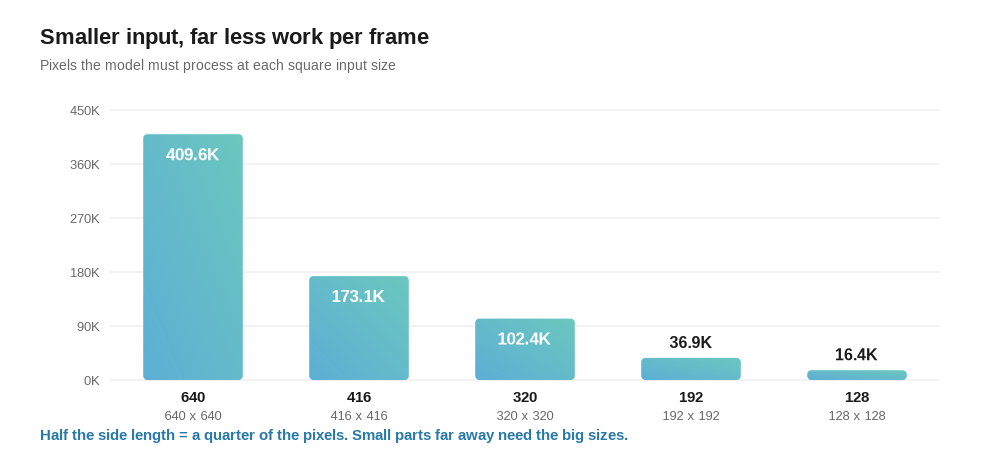
- Input size. Lower it until small or distant parts start to be missed.
Where DIY projects go wrong
We like it when teams have a go themselves. But stalled vision projects tend to stall for the same handful of reasons, and almost none of them is about picking the wrong model.
- The training data came from the wrong place. Photos taken on a bench, under office lights, of parts held still. The model does well in the demo and falls apart on the line, where there is motion blur, glare and a different background.
- There weren’t enough defects. The model scored 99% in testing and caught almost nothing, because 99% of the test parts were good.
- The prototype ran on a gaming GPU. On the small industrial PC that actually goes on the line, the same model can drop to a couple of frames per second. The belt doesn’t slow down to match.
- Nobody fixed the lighting. This one is boring and it matters more than the model. A cheap diffuse light and a hood over the camera can do more for accuracy than a month of tuning.
- The licence surprised someone late. The Ultralytics YOLO package is AGPL-3.0, which has real obligations if you ship it inside a closed product, unless you buy their enterprise licence. RF-DETR’s core models are Apache 2.0, but some sizes use a separate platform licence. Finding this out after launch is expensive.
- Nobody planned for change. New product, new supplier, new paint colour, and the model quietly gets worse. A system needs a way to collect the images it’s unsure about, have a person label them, and retrain. Without that, accuracy drifts down and nobody notices until a customer does.
- The model replaced people instead of helping them. The setups that work best keep an inspector in the loop for the uncertain calls, at least at first. The camera handles volume. The person handles judgement.
Each of these is cheap to avoid at the start and costly to fix at the end. That is most of the value an experienced team brings.
Build, buy, or something in between
Large industrial vision vendors sell complete, supported systems. They make sense for certified, regulated checks where you want a vendor to call.
A custom stack built on open models and any industrial camera with a decent SDK costs less and doesn’t tie you to one vendor. The catch is that someone has to own the data and the retraining. That can be your team, or it can be us. Many plants end up with both: vendor systems for the regulated checks, and a custom stack for everything else.
Where to start
Pick one station where defects escape or inspection is slow. Then:
- Write down exactly what the camera must find, with photos of real good and bad parts.
- Try an open-vocabulary model on the real line before you train anything.
- If you need to train, record data from the real camera, light and belt speed.
- Collect enough defect examples, and plan how to keep collecting them.
- For small defects, use find-then-judge.
- Measure speed on the target device before building the app.
- Check the licence of the exact model you plan to ship.
- Keep a person in the loop for uncertain calls, and retrain from what they label.
How we can help
We build custom vision systems through our AI development service. That covers recording and labelling data on your line, training and comparing models, and testing speed on the device that will sit at the station.
If the results need to reach a dashboard or the systems your plant already runs, our software development team builds that part.
If you want help with the first station, talk to us. We’ll look at your line, tell you honestly whether vision is the right fix, and if it is, get a pilot running on real parts.


